概述

上一篇解析了 NodeSelectorSlot 对资源的收集,其中资源会保存为 DefaultNode,而 DefaultNode 的核心能力都依赖于 StatisticNode 实现,所以这篇对 StatisticNode 做一个详细的解析。

解析

类图

StatisticNode
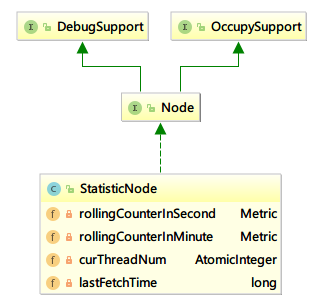
Node

Node 定义了对资源统计的接口

1
2
3
4
5
6
7
8
9
10
11
12
13
14
15
16
17
18
19
20
21
22
23
24
25
26
27
28
29
30
31
32
33
34
35
36
37
38
39
40
41
42
43
44
45
46
47
48
49
50
public interface Node extends OccupySupport, DebugSupport {

long totalRequest();

long totalPass();

long totalSuccess();

long blockRequest();

long totalException();

double passQps();

double blockQps();

double totalQps();

double successQps();

double maxSuccessQps();

double exceptionQps();

double avgRt();

double minRt();

int curThreadNum();

double previousBlockQps();

double previousPassQps();

Map<Long, MetricNode> metrics();

void addPassRequest(int count);

void addRtAndSuccess(long rt, int success);

void increaseBlockQps(int count);

void increaseExceptionQps(int count);

void increaseThreadNum();

void decreaseThreadNum();

void reset();
}

StatisticNode

StatisticNode 负责对资源进行统计比如通过的请求QPS、被限流的请求QPS、请求的平均RT等等

继承关系

1
public class StatisticNode implements Node {}

成员变量

1
2
3
4
5
6
7
8
9
10
11
12
13
14
15
16
17
18
19
20
21
22
// 秒级时间窗口统计
private transient volatile Metric rollingCounterInSecond = new ArrayMetric(SampleCountProperty.SAMPLE_COUNT,
IntervalProperty.INTERVAL);

/**
* Holds statistics of the recent 60 seconds. The windowLengthInMs is deliberately set to 1000 milliseconds,
* meaning each bucket per second, in this way we can get accurate statistics of each second.
*/
// 分钟级时间窗口统计
private transient Metric rollingCounterInMinute = new ArrayMetric(60, 60 * 1000, false);

/**
* The counter for thread count.
*/
// 线程数统计
private AtomicInteger curThreadNum = new AtomicInteger(0);

/**
* The last timestamp when metrics were fetched.
*/
// 最近更新时间
private long lastFetchTime = -1;

核心方法

分析以下方法可以发现 StatisticNode 对资源的统计都是依赖 ArrayMetric 来实现的。

重置 reset

1
2
3
4
@Override
public void reset() {
rollingCounterInSecond = new ArrayMetric(SampleCountProperty.SAMPLE_COUNT, IntervalProperty.INTERVAL);
}

通过的请求数增加 addPassRequest

1
2
3
4
5
@Override
public void addPassRequest(int count) {
rollingCounterInSecond.addPass(count);
rollingCounterInMinute.addPass(count);
}

被限流的QPS增加 increaseBlockQps

1
2
3
4
5
@Override
public void increaseBlockQps(int count) {
rollingCounterInSecond.addBlock(count);
rollingCounterInMinute.addBlock(count);
}

计算平均rt

1
2
3
4
5
6
7
8
9
@Override
public double avgRt() {
long successCount = rollingCounterInSecond.success();
if (successCount == 0) {
return 0;
}

return rollingCounterInSecond.rt() * 1.0 / successCount;
}

计算通过的QPS

1
2
3
4
@Override
public double passQps() {
return rollingCounterInSecond.pass() / rollingCounterInSecond.getWindowIntervalInSec();
}

尝试占用下一周期 tryOccupyNext

尝试借用后续时间窗格的通过数

1
2
3
4
5
6
7
8
9
10
11
12
13
14
15
16
17
18
19
20
21
22
23
24
25
26
27
28
29
30
31
32
33
34
35
36
37
38
39
40
41
42
@Override
public long tryOccupyNext(long currentTime, int acquireCount, double threshold) {
double maxCount = threshold * IntervalProperty.INTERVAL / 1000;
// 当前秒等待的请求数
long currentBorrow = rollingCounterInSecond.waiting();
// 达到上限则返回占用超时500
if (currentBorrow >= maxCount) {
return OccupyTimeoutProperty.getOccupyTimeout();
}
// 单个时间窗格时间长度 1000/2
int windowLength = IntervalProperty.INTERVAL / SampleCountProperty.SAMPLE_COUNT;
// 下个时间窗格的开始时间
long earliestTime = currentTime - currentTime % windowLength + windowLength - IntervalProperty.INTERVAL;

int idx = 0;
/*
* Note: here {@code currentPass} may be less than it really is NOW, because time difference
* since call rollingCounterInSecond.pass(). So in high concurrency, the following code may
* lead more tokens be borrowed.
*/
long currentPass = rollingCounterInSecond.pass();
// 循环等待
// 当前已经超过下一个时间窗格的时间
while (earliestTime < currentTime) {
// 计算等待的时间
long waitInMs = idx * windowLength + windowLength - currentTime % windowLength;
// 等待时间超过 500
if (waitInMs >= OccupyTimeoutProperty.getOccupyTimeout()) {
break;
}
long windowPass = rollingCounterInSecond.getWindowPass(earliestTime);
// 当前通过的 + 当前等待的 + 需要等待的 - 下一个窗口通过的 <= 上限
if (currentPass + currentBorrow + acquireCount - windowPass <= maxCount) {
return waitInMs;
}
earliestTime += windowLength;
currentPass -= windowPass;
idx++;
}
// 返回500
return OccupyTimeoutProperty.getOccupyTimeout();
}

指标类 Metric

Metric 提供了各种指标的操作方法

1
2
3
4
5
6
7
8
9
10
11
12
13
14
15
16
17
18
19
20
21
22
23
24
25
public interface Metric extends DebugSupport {
long success();
long maxSuccess();
long exception();
long block();
long pass();
long rt();
long minRt();
List<MetricNode> details();
MetricBucket[] windows();
void addException(int n);
void addBlock(int n);
void addSuccess(int n);
void addPass(int n);
void addRT(long rt);
double getWindowIntervalInSec();
int getSampleCount();
long getWindowPass(long timeMillis);
void addOccupiedPass(int acquireCount);
void addWaiting(long futureTime, int acquireCount);
long waiting();
long occupiedPass();
long previousWindowBlock();
long previousWindowPass();
}

指标桶 MetricBucket

MetricBucket 负责保存指标信息,实际进行指标记录和计算的类,counters数组保存各种事件的计算值,minRt记录最小rt时间。

1
2
3
4
5
6
7
8
9
10
11
12
13
14
15
16
17
18
19
20
21
22
23
24
25
26
27
28
29
30
31
32
33
34
35
36
37
38
39
40
41
42
43
44
45
46
47
48
49
50
51
52
53
54
55
56
57
58
59
60
61
62
63
64
65
66
67
68
69
70
71
72
73
74
75
76
public class MetricBucket {

private final LongAdder[] counters; // 数组每个元素代表一个时间的计数值

private volatile long minRt;

public MetricBucket() {
MetricEvent[] events = MetricEvent.values();
this.counters = new LongAdder[events.length];
for (MetricEvent event : events) {
counters[event.ordinal()] = new LongAdder();
}
initMinRt();
}

public MetricBucket reset(MetricBucket bucket) {
for (MetricEvent event : MetricEvent.values()) {
counters[event.ordinal()].reset();
counters[event.ordinal()].add(bucket.get(event));
}
initMinRt();
return this;
}

private void initMinRt() {
this.minRt = Constants.TIME_DROP_VALVE;
}

public MetricBucket reset() {
for (MetricEvent event : MetricEvent.values()) {
counters[event.ordinal()].reset();
}
initMinRt();
return this;
}

public long get(MetricEvent event) {
return counters[event.ordinal()].sum();
}

public MetricBucket add(MetricEvent event, long n) {
counters[event.ordinal()].add(n);
return this;
}

public long pass() {
return get(MetricEvent.PASS);
}

public long occupiedPass() {
return get(MetricEvent.OCCUPIED_PASS);
}

public long block() {
return get(MetricEvent.BLOCK);
}

public void addPass(int n) {
add(MetricEvent.PASS, n);
}

public void addOccupiedPass(int n) {
add(MetricEvent.OCCUPIED_PASS, n);
}


public void addRT(long rt) {
add(MetricEvent.RT, rt);

// Not thread-safe, but it's okay.
if (rt < minRt) {
minRt = rt;
}
}
// 省略部分方法
}

指标实现类 ArrayMetric

ArrayMetric 实现了指标接口 Metric,其中使用 LeapArray 来处理时间窗口,每个时间窗口中存储着指标桶对象 MetricBucket,MetricBucket来处理单位时间内的指标数据。

继承关系

1
public class ArrayMetric implements Metric {}

成员变量

1
private final LeapArray<MetricBucket> data;

构造器

1
2
3
4
5
6
7
8
9
10
11
public ArrayMetric(int sampleCount, int intervalInMs) {
this.data = new OccupiableBucketLeapArray(sampleCount, intervalInMs);
}

public ArrayMetric(int sampleCount, int intervalInMs, boolean enableOccupy) {
if (enableOccupy) {
this.data = new OccupiableBucketLeapArray(sampleCount, intervalInMs);
} else {
this.data = new BucketLeapArray(sampleCount, intervalInMs);
}
}

核心方法

已经block的请求数 block
1
2
3
4
5
6
7
8
9
10
@Override
public long block() {
data.currentWindow();
long block = 0;
List<MetricBucket> list = data.values();
for (MetricBucket window : list) {
block += window.block();
}
return block;
}
增加Block的请求数 addBlock
1
2
3
4
5
@Override
public void addBlock(int count) {
WindowWrap<MetricBucket> wrap = data.currentWindow();
wrap.value().addBlock(count);
}

其他的统计成功请求、异常请求数等方法与Block统计类似依赖于 LeapArray data 实现。

LeapArray

Basic data structure for statistic metrics in Sentinel.
Leap array use sliding window algorithm to count data. Each bucket cover {@code windowLengthInMs} time span, and the total time span is {@link #intervalInMs}, so the total bucket amount is:
{@code sampleCount = intervalInMs / windowLengthInMs}.

成员变量

1
2
3
4
5
6
7
protected int windowLengthInMs; // 一个窗口的实际长度(ms)
protected int sampleCount; // 窗口个数
protected int intervalInMs; // 总时间间隔

protected final AtomicReferenceArray<WindowWrap<T>> array; // 窗口对象数字,原子性可以cas更新

private final ReentrantLock updateLock = new ReentrantLock();

WindowWrap 有三个属性:窗口时间长度windowLengthInMs、窗口开始时间windowStart、值value

AtomicReferenceArray与AtomicInteger之类的类似,是原子性的数组,更新元素时通过cas的方式更新。

构造器

1
2
3
4
5
6
7
8
9
10
11
public LeapArray(int sampleCount, int intervalInMs) {
AssertUtil.isTrue(sampleCount > 0, "bucket count is invalid: " + sampleCount);
AssertUtil.isTrue(intervalInMs > 0, "total time interval of the sliding window should be positive");
AssertUtil.isTrue(intervalInMs % sampleCount == 0, "time span needs to be evenly divided");

this.windowLengthInMs = intervalInMs / sampleCount;
this.intervalInMs = intervalInMs;
this.sampleCount = sampleCount;

this.array = new AtomicReferenceArray<>(sampleCount);
}

核心方法

计算时间窗口序号 calculateTimeIdx

根据时间(timeMillis)按照时间窗口的长度计算落在哪个时间窗口

时间窗口序号 = 时间 / 时间窗口时间长度 % 窗口个数

1
2
3
4
5
private int calculateTimeIdx(/*@Valid*/ long timeMillis) {
long timeId = timeMillis / windowLengthInMs;
// Calculate current index so we can map the timestamp to the leap array.
return (int)(timeId % array.length());
}

计算时间窗口开始时间 calculateWindowStart

根据时间窗口时间长度取整

开始时间 = 时间 - 时间%时间窗口时间长度

时间是15,时间窗口时间长度是10,则开始时间就是:

  • 15 - 15%10 = 10
1
2
3
protected long calculateWindowStart(/*@Valid*/ long timeMillis) {
return timeMillis - timeMillis % windowLengthInMs;
}
获取当前时间的时间窗口
1
2
3
public WindowWrap<T> currentWindow() {
return currentWindow(TimeUtil.currentTimeMillis());
}

获取当前时间的时间窗口的逻辑:

  1. 计算时间窗口的序号和时间窗口的开始时间;
  2. 获取时间窗口,有四种情况:
    1. 根据时间窗口序号获取的时间窗口对象为null,则new一个时间窗口对象cas更新;
    2. 计算的开始时间=时间窗口的开始时间,则返回这个时间窗口;
    3. 计算的开始时间>时间窗口的开始时间,则尝试获取更新锁并resetWindowTo返回;
    4. 计算的开始时间<时间窗口的开始时间,则返回一个空的。
1
2
3
4
5
6
7
8
9
10
11
12
13
14
15
16
17
18
19
20
21
22
23
24
25
26
27
28
29
30
31
32
33
34
35
36
37
38
39
40
41
42
43
public WindowWrap<T> currentWindow(long timeMillis) {
if (timeMillis < 0) {
return null;
}
// 计算时间窗口的序号
int idx = calculateTimeIdx(timeMillis);
// 计算时间窗口的开始时间
long windowStart = calculateWindowStart(timeMillis);

while (true) {
// 根据序号获取时间窗口
WindowWrap<T> old = array.get(idx);
// 刚开始(第一个)
if (old == null) {
WindowWrap<T> window = new WindowWrap<T>(windowLengthInMs, windowStart, newEmptyBucket(timeMillis));
// cas 更新
if (array.compareAndSet(idx, null, window)) {
// Successfully updated, return the created bucket.
return window;
} else { // 其它线程更新成功了
// Contention failed, the thread will yield its time slice to wait for bucket available.
Thread.yield();
}
} else if (windowStart == old.windowStart()) { // 开始时间相等
return old;
} else if (windowStart > old.windowStart()) { // 已经超过旧的窗口了
if (updateLock.tryLock()) { // 更新加锁
try {
// Successfully get the update lock, now we reset the bucket.
return resetWindowTo(old, windowStart); // 对象复用,重置一下状态
} finally {
updateLock.unlock();
}
} else {
// Contention failed, the thread will yield its time slice to wait for bucket available.
Thread.yield();
}
} else if (windowStart < old.windowStart()) { // 晚了
// Should not go through here, as the provided time is already behind.
return new WindowWrap<T>(windowLengthInMs, windowStart, newEmptyBucket(timeMillis));
}
}
}
获取时间窗口中的值 getWindowValue
1
2
3
4
5
6
7
8
9
10
11
12
13
14
public T getWindowValue(long timeMillis) {
if (timeMillis < 0) {
return null;
}
int idx = calculateTimeIdx(timeMillis);

WindowWrap<T> bucket = array.get(idx);

if (bucket == null || !bucket.isTimeInWindow(timeMillis)) {
return null;
}

return bucket.value();
}

LeapArray的子类

功能
FutureBucketLeapArray 存储未来的Bucket
OccupiableBucketLeapArray 内置FutureBucketLeapArray,处理等待的情况
FutureBucketLeapArray
1
2
3
4
5
6
7
8
9
10
11
12
13
14
15
16
17
18
19
20
21
22
23
24
25
26
public class FutureBucketLeapArray extends LeapArray<MetricBucket> {

public FutureBucketLeapArray(int sampleCount, int intervalInMs) {
// This class is the original "BorrowBucketArray".
super(sampleCount, intervalInMs);
}

@Override
public MetricBucket newEmptyBucket(long time) {
return new MetricBucket();
}

@Override
protected WindowWrap<MetricBucket> resetWindowTo(WindowWrap<MetricBucket> w, long startTime) {
// Update the start time and reset value.
w.resetTo(startTime);
w.value().reset();
return w;
}

@Override
public boolean isWindowDeprecated(long time, WindowWrap<MetricBucket> windowWrap) {
// Tricky: will only calculate for future.
return time >= windowWrap.windowStart();
}
}
OccupiableBucketLeapArray

OccupiableBucketLeapArray 类中持有 borrowArray(FutureBucketLeapArray)属性

com.alibaba.csp.sentinel.node.StatisticNode#addWaitingRequest -> com.alibaba.csp.sentinel.slots.statistic.metric.Metric#addWaiting

  • 在添加Waiting计数的时候会使用borrowArray记录;
  • 当newEmptyBucket的时候会将borrowArray中记录的数据返回给新的MetricBucket
1
2
3
4
5
6
7
8
9
10
11
12
13
14
15
16
17
18
19
20
21
22
23
24
25
26
27
28
29
30
31
32
33
34
35
36
37
38
39
40
41
42
43
44
45
46
47
48
49
50
51
52
53
54
55
public class OccupiableBucketLeapArray extends LeapArray<MetricBucket> {

private final FutureBucketLeapArray borrowArray;

public OccupiableBucketLeapArray(int sampleCount, int intervalInMs) {
// This class is the original "CombinedBucketArray".
super(sampleCount, intervalInMs);
this.borrowArray = new FutureBucketLeapArray(sampleCount, intervalInMs);
}

@Override
public MetricBucket newEmptyBucket(long time) {
MetricBucket newBucket = new MetricBucket();

MetricBucket borrowBucket = borrowArray.getWindowValue(time);
if (borrowBucket != null) {
newBucket.reset(borrowBucket);
}

return newBucket;
}

@Override
protected WindowWrap<MetricBucket> resetWindowTo(WindowWrap<MetricBucket> w, long time) {
// Update the start time and reset value.
w.resetTo(time);
MetricBucket borrowBucket = borrowArray.getWindowValue(time);
if (borrowBucket != null) {
w.value().reset();
w.value().addPass((int)borrowBucket.pass());
} else {
w.value().reset();
}

return w;
}

@Override
public long currentWaiting() {
borrowArray.currentWindow();
long currentWaiting = 0;
List<MetricBucket> list = borrowArray.values();

for (MetricBucket window : list) {
currentWaiting += window.pass();
}
return currentWaiting;
}

@Override
public void addWaiting(long time, int acquireCount) {
WindowWrap<MetricBucket> window = borrowArray.currentWindow(time);
window.value().add(MetricEvent.PASS, acquireCount);
}
}